Conditional Statements in C++: if, if-else, else-if & switch Explained with Examples
Last modified - 25-07-2026
Author - Krishna Shinde
If you're going through a C++ tutorial or any set of coding tutorials for beginners, one day you run into the topic called conditional statements. They're the foundation of decision-making in code, letting your program choose what to do based on a condition that is either true or false.
This cpp tutorial focuses entirely on conditionals: if, if-else, else if, and the switch statement. Each one is explained with syntax and multiple real, runnable examples so you can see exactly how they behave in practice.
By the end of this c++ language tutorial, you'll be comfortable choosing the right conditional structure for any situation you encounter.
Flowchart of if and if else statement
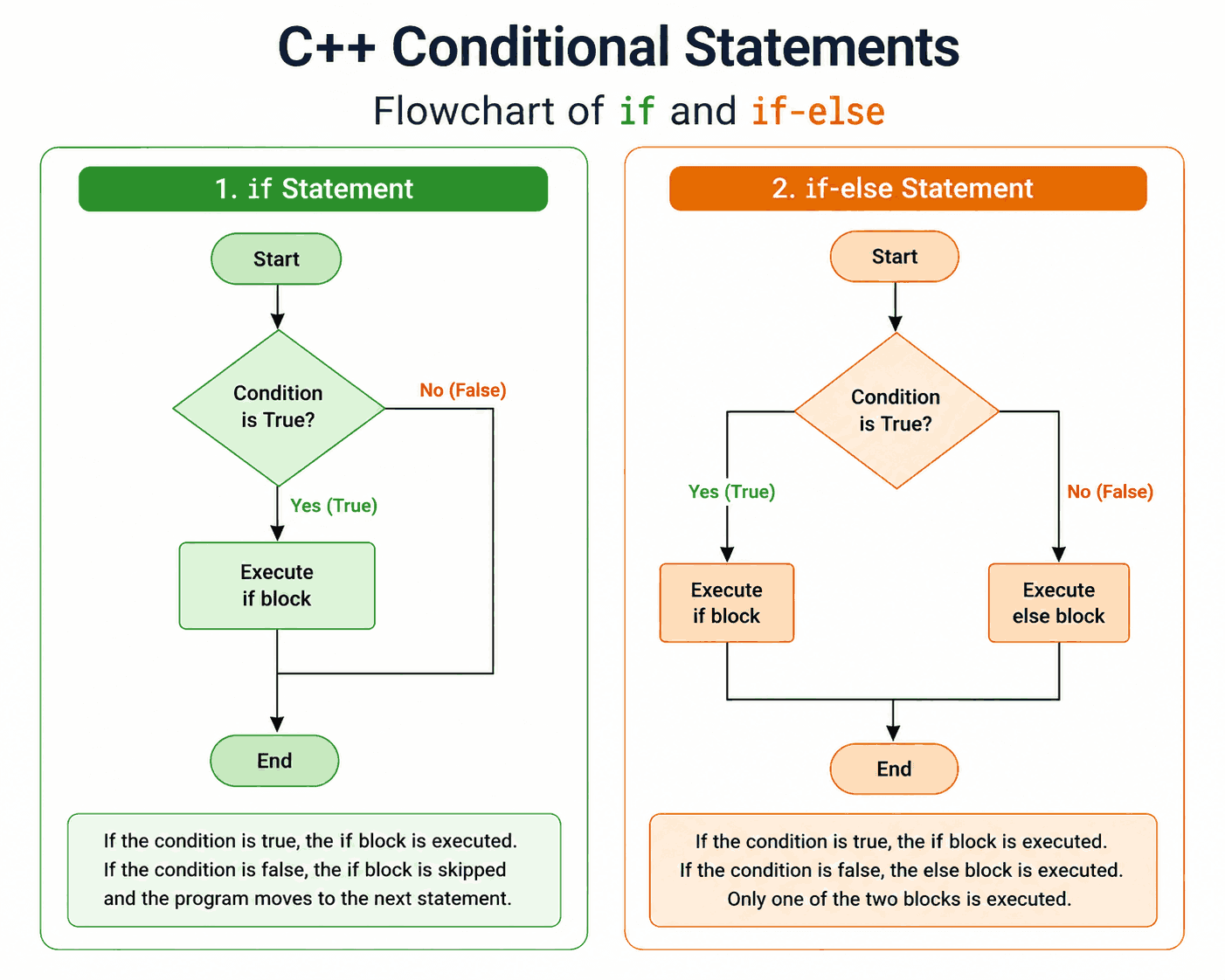
The if Statement in C++
The if statement is the simplest form of conditional logic. The code inside the block runs only if the condition evaluates to true. If it's false, the block is skipped entirely, and nothing happens.
Syntax
if (condition) {
    // code runs only if condition is true
}
Example 1: Checking Voting Eligibility
#include <iostream>
using namespace std;

int main() {
    int age = 20;

    if (age >= 18) {
        cout << "You are eligible to vote." << endl;
    }

    return 0;
}
Output:
You are eligible to vote.Example 2: Checking If a Number Is Positive
#include <iostream>
using namespace std;

int main() {
    int num = 15;

    if (num > 0) {
        cout << num << " is a positive number." << endl;
    }

    return 0;
}
Output:
15 is a positive number.Example 3: Checking Login Access
#include <iostream>
using namespace std;

int main() {
    string username = "admin";

    if (username == "admin") {
        cout << "Access granted to admin panel." << endl;
    }

    return 0;
}
Output:
Access granted to admin panel.The if-else Statement in C++
The if-else statement adds a fallback path. If the condition is true, the if block runs; otherwise, the else block runs instead. This ensures one of the two blocks always executes.
Syntax
if (condition) {
    // runs if condition is true
} else {
    // runs if condition is false
}
Example 1: Even or Odd Number
#include <iostream>
using namespace std;

int main() {
    int num = 7;

    if (num % 2 == 0) {
        cout << num << " is even." << endl;
    } else {
        cout << num << " is odd." << endl;
    }

    return 0;
}
Output:
7 is odd.Example 2: Pass or Fail Check
#include <iostream>
using namespace std;

int main() {
    int marks = 35;

    if (marks >= 40) {
        cout << "Result: Pass" << endl;
    } else {
        cout << "Result: Fail" << endl;
    }

    return 0;
}
Output:
Result: FailExample 3: Comparing Two Numbers
#include <iostream>
using namespace std;

int main() {
    int a = 10, b = 25;

    if (a > b) {
        cout << a << " is greater than " << b << endl;
    } else {
        cout << b << " is greater than " << a << endl;
    }

    return 0;
}
Output:
25 is greater than 10Flowchart of else if Ladder statement
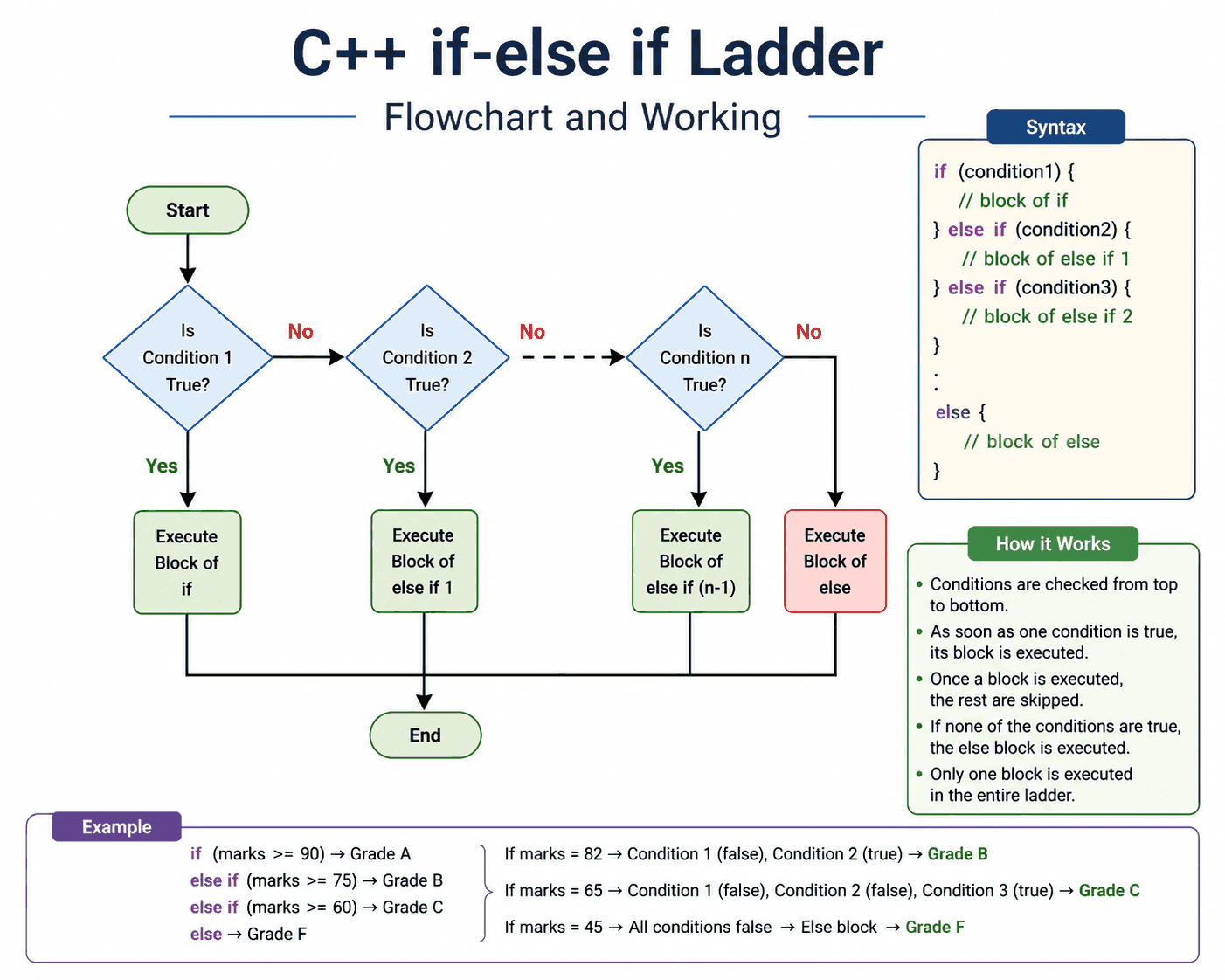
The else if Ladder in C++
When you need to check more than two possible outcomes, the else if ladder lets you test multiple conditions in sequence. C++ evaluates each condition from top to bottom and executes the first block whose condition is true. If none match, the final else (if present) runs.
Syntax
if (condition1) {
    // runs if condition1 is true
} else if (condition2) {
    // runs if condition2 is true
} else {
    // runs if none of the above are true
}
Example 1: Grading System
#include <iostream>
using namespace std;

int main() {
    int marks = 72;

    if (marks >= 90) {
        cout << "Grade: A" << endl;
    } else if (marks >= 75) {
        cout << "Grade: B" << endl;
    } else if (marks >= 60) {
        cout << "Grade: C" << endl;
    } else {
        cout << "Grade: F" << endl;
    }

    return 0;
}
Output:
Grade: CExample 2: Categorizing Age Groups
#include <iostream>
using namespace std;

int main() {
    int age = 45;

    if (age <= 12) {
        cout << "Child" << endl;
    } else if (age <= 19) {
        cout << "Teenager" << endl;
    } else if (age <= 59) {
        cout << "Adult" << endl;
    } else {
        cout << "Senior Citizen" << endl;
    }

    return 0;
}
Output:
AdultExample 3: Simple Temperature Checker
#include <iostream>
using namespace std;

int main() {
    int temp = 5;

    if (temp <= 0) {
        cout << "Freezing" << endl;
    } else if (temp <= 15) {
        cout << "Cold" << endl;
    } else if (temp <= 25) {
        cout << "Warm" << endl;
    } else {
        cout << "Hot" << endl;
    }

    return 0;
}
Output:
ColdFlowchart of switch statement
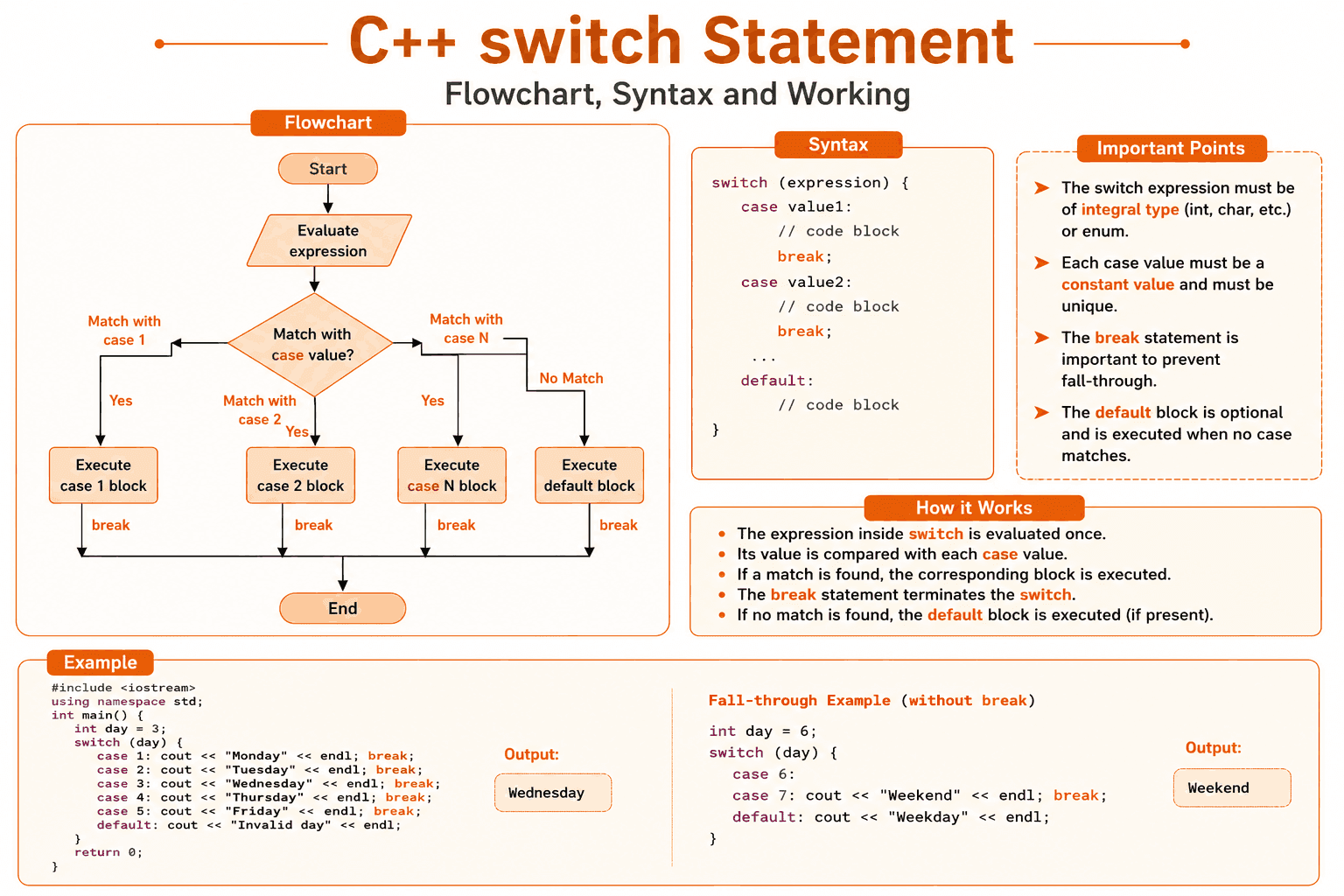
The switch Statement in C++
The switch statement compares a single variable against multiple constant values (called case labels). It's a cleaner alternative to a long else if ladder when you're checking one variable against many possible fixed values, such as menu options, day numbers, or grade letters.
Syntax
switch (expression) {
    case value1:
        // code block
        break;
    case value2:
        // code block
        break;
    default:
        // runs if no case matches
}
Important: The break statement stops execution from "falling through" into the next case. Forgetting it is one of the most common mistakes in a c++ tutorial on switch statements.
Example 1: Day of the Week
#include <iostream>
using namespace std;

int main() {
    int day = 3;

    switch (day) {
        case 1:
            cout << "Monday" << endl;
            break;
        case 2:
            cout << "Tuesday" << endl;
            break;
        case 3:
            cout << "Wednesday" << endl;
            break;
        case 4:
            cout << "Thursday" << endl;
            break;
        case 5:
            cout << "Friday" << endl;
            break;
        default:
            cout << "Invalid day" << endl;
    }

    return 0;
}
Output:
WednesdayExample 2: Simple Calculator
#include <iostream>
using namespace std;

int main() {
    char op = '+';
    int a = 10, b = 5;

    switch (op) {
        case '+':
            cout << a + b << endl;
            break;
        case '-':
            cout << a - b << endl;
            break;
        case '*':
            cout << a * b << endl;
            break;
        case '/':
            cout << a / b << endl;
            break;
        default:
            cout << "Invalid operator" << endl;
    }

    return 0;
}
Output:
15Example 3: Grouping Weekend Days (Fall-Through)
#include <iostream>
using namespace std;

int main() {
    int day = 7;

    switch (day) {
        case 1:
        case 2:
        case 3:
        case 4:
        case 5:
            cout << "Weekday" << endl;
            break;
        case 6:
        case 7:
            cout << "Weekend" << endl;
            break;
        default:
            cout << "Invalid day" << endl;
    }

    return 0;
}
Output:
WeekendExample 4: Menu-Driven Program
#include <iostream>
using namespace std;

int main() {
    int choice = 2;

    switch (choice) {
        case 1:
            cout << "You selected: View Profile" << endl;
            break;
        case 2:
            cout << "You selected: Edit Settings" << endl;
            break;
        case 3:
            cout << "You selected: Logout" << endl;
            break;
        default:
            cout << "Invalid menu choice" << endl;
    }

    return 0;
}
Output:
You selected: Edit SettingsExample 5: Grade Letter to Description
#include <iostream>
using namespace std;

int main() {
    char grade = 'B';

    switch (grade) {
        case 'A':
            cout << "Excellent!" << endl;
            break;
        case 'B':
            cout << "Good job!" << endl;
            break;
        case 'C':
            cout << "Fair" << endl;
            break;
        case 'D':
            cout << "Needs improvement" << endl;
            break;
        default:
            cout << "Invalid grade" << endl;
    }

    return 0;
}
Output:
Good job!Quick Comparison: Which Conditional Should You Use?
| Statement | Best Used When |
|---|---|
| if | You only need to check one condition, with no alternative action. |
| if-else | You need exactly two possible outcomes (true or false). |
| else if | You're checking multiple, ranged, or complex conditions. |
| switch | You're comparing one variable against many fixed constant values. |
Conclusion
Conditionals are the starting point of logical thinking in programming, and mastering if, if-else, else if, and switch is essential in any c++ tutorial. With the examples above, you've seen each statement used in real world situations, from grading systems to calculators to menu-driven programs.
Keep practicing by tweaking these examples: change the values, add new cases, or combine conditionals with loops. That kind of hands-on repetition is exactly what makes concepts stick in coding tutorials, and it will make the rest of your C++ language tutorial journey much easier.