Data Types - C++ Tutorial
Last modified - 22-07-2026
Author - Krishna Shinde
Any value you use in your program, whether it may be a number, character, or decimal value, has to be stored somewhere in memory. But before the computer can store it in memory, it needs to know what type of value it is storing. That's where data types come into play.
In C++, data types tell the compiler two important things: how much memory needs to be allocated for the value, and what kind of operations are valid on it. Using the correct data type is significant as it ensures the safety and efficiency of the program. If you choose the wrong data type, you may encounter overflow, precision loss, or truncation.
C++ is a statically typed language, which means you need to define the data type of every variable during compile time. This is different from languages like Python, where a variable can hold a string and later can be changed to a number. In C++, once you declare a variable's type, it stays that type for its entire lifetime.
In this C++ tutorial, you will get to know about every category of data type in C++, their sizes, their ranges, and when to use which data type.
What Are Data Types in C++?
A data type is a classification that tells the compiler:
- 1. How much memory to allocate for a value
- 2. How to understand the bits stored in the memory
- 3. What operations can be performed on the value
For example, if the same bit pattern is stored for an int and float, the compiler will treat both of them differently because their data type is different, even though at the hardware level, it's just 1s and 0s. The data type gives that raw memory a meaning.
Because C++ checks data types during compile time, many type-related errors get caught before your program runs.
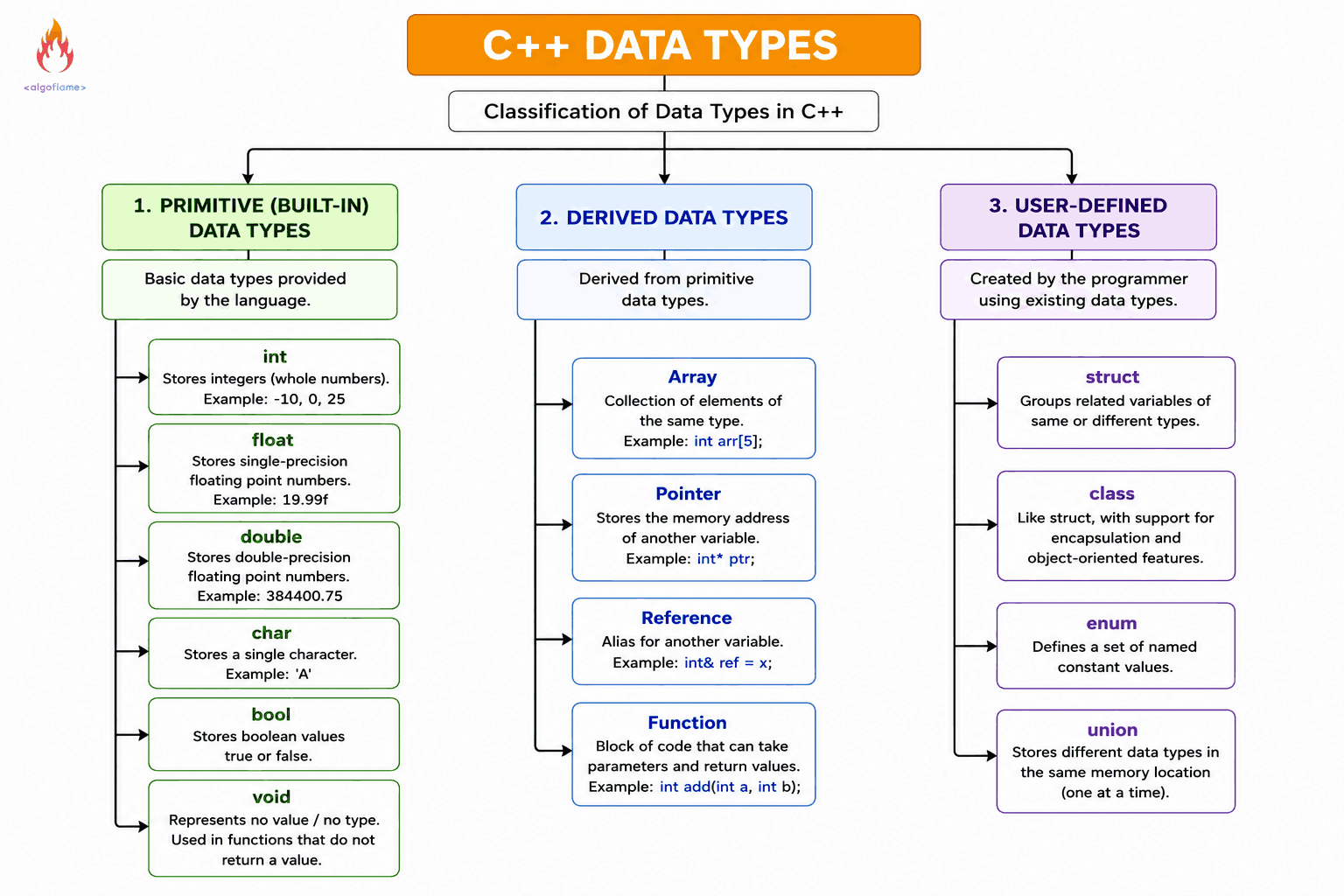
Classification of Data Types in C++
1. Primitive Data Types: These are built-in data types provided by the language.
2. Derived data types: These are built from primitive data types: arrays, pointers, references, and functions.
3. User-Defined Data Types: These are the data types created by the programmer: struct, class, union, and enum.
We'll cover primitive types in depth, since they're the foundation of everything else, and give a preview of the other two categories.
Primitive Data Types in C++
int — Integers
Used for all the positive and negative numbers, including zero without a decimal point.
int age = 25;
int temperature = -10;
On a modern system, an int is of 4 bytes and can hold values from -2,147,483,648 to 2,147,483,647.
float and double — Integers
Used for the numbers with a decimal point.
float price = 19.99f;
double distance = 384400.75;
The difference between float and double in C++
- A float is typically 4 bytes, offering about 6-7 decimal digits of precision.
- A double is typically 8 bytes, offering about 15-16 decimal digits of precision.
As a rule of thumb: use double unless you have a specific reason (like memory constraints) to use float. double is actually the default floating-point type in C++.
char — Characters
Used to store a single character, on most systems char is stored as its corresponding ASCII value.
char grade = 'A';
char is of 1 byte and can represent 256 different values (0-255 for unsigned, -128 to 127 for signed).
bool — Boolean
Used to store one of the values, either true or false.
bool isPassed = true;
A bool is of 1 byte, although it only needs one bit.
void — The Empty Type
void represents "no type" or "no value." You cannot declare a variable of type void, but you'll use it as a function's return type when the function doesn't return anything:
void printMessage() {
 	std::cout << "Hello!";
}
Data Types in C++ with size and range
| Data Type | Size | Range |
|---|---|---|
| int | 4 bytes | -2,147,483,648 to 2,147,483,647 |
| float | 4 bytes | ~1.2E-38 to 3.4E+38 (6-7 digit precision) |
| double | 8 bytes | ~2.3E-308 to 1.7E+308 (15-16 digit precision) |
| char | 1 byte | -128 to 127 (or 0 to 255 unsigned) |
| bool | 1 byte | true or false |
Note: Exact sizes can vary by compiler and system architecture. Use the sizeof() operator (covered below) to check on your own machine.
Type Modifiers in C++
Type modifiers change the size or range of primitive data types.
- signed — can hold both positive and negative values (default for int and char)
- unsigned — can hold only non-negative values, but doubles the positive range
- short — usually uses less memory than int
- long — uses more memory, larger range
unsigned int population = 4294967294U;
short int smallNumber = 100;
long long int bigNumber = 9000000000LL;
An unsigned is useful when a value will never be negative (like a count or an array size), since it doubles the positive range while giving up negative numbers.
Derived Data Types in C++
Arrays — a collection of values of the same type:
int scores[5];
Pointers — a variable that stores a memory address:
int* ptr;
References — an alias or alternative name for another variable:
int& ref = age;
Functions — blocks of reusable code that can take typed parameters and return typed values.
int add(int a, int b) {
 	return a + b;
};
User Defined Data Types in C++
User defined data types let you create a custom data type by using the existing data types.
struct — groups related variables of same or different data types together under one name
struct Student {
 	string name;
	int age;
};;
class — like a struct, but with support for encapsulation, methods, and object-oriented features
class Student {
 private:
	string name;
	int age;
};;
enum — it is a user-defined data type that lets you create a set of named constant values. It makes code more readable by replacing numeric constants with meaningful names.
enum Color {
 	RED;
	ORANGE;
};;
union — stores different data types in the same memory location, one at a time
union Val {
 	int i;
	float j;
};;
The sizeof() Operator in C++
It is used to know exactly how much memory does a data type takes on your system.
The int before the main indicates that the function on execution returns an integer value to the operating system, thus the return type of main in int.
The empty parentheses () after main indicate that the function does not take any arguments.
#include <iostream>

int main() {
    std::cout << "Size of int: " << sizeof(int) << " bytes
";
    std::cout << "Size of float: " << sizeof(float) << " bytes
";
    std::cout << "Size of double: " << sizeof(double) << " bytes
";
    std::cout << "Size of char: " << sizeof(char) << " bytes
";
    std::cout << "Size of bool: " << sizeof(bool) << " bytes
";
    return 0;
}
This is useful when you are writing memory-sensitive code or when you're not sure how much memory your system takes for a data type.
Type Conversion in C++ (Type Casting)
Sometimes you need to convert a value from one type to another, this is where type casting comes to play, C++ has two types of conversion:
Implicit conversion (done automatically by the compiler):
int a = 10;
double b = a; // int automatically converted to double;
Explicit conversion (done manually, also called casting):
double price = 19.99;
int truncatedPrice = (int)price; // truncatedPrice becomes 19;
Be careful with the conversions, converting a larger data type to a smaller data type (like double to int) may lose data and mixing signed and unsigned data types can give unexpected results.
C++ Data Types - Best Practices
- Don't use float when you need precision — financial calculations or other values which require more precision are better suited to double or dedicated decimal libraries.
- Watch for overflow — Overflow happens when you store a value that is too large or too small for a data type. Instead of giving an error, C++ may produce an incorrect value. C++ does not throw an error when an overflow occurs, the result depends on the type of the value or the operation, For unsigned integer, wraparound is well defined but for signed integer, overflow is an undefined behaviour.
- Be intentional with unsigned — mixing signed and unsigned integers in comparisons may produce unexpected results.
- Initialize your variables — an uninitialized variable holds garbage data, regardless of its type.
Conclusion
Data types are the foundation of everything you do in C++. They determine how much memory each value occupies, how precisely it can store values, and what kind operations are valid on the stored value.
Now in this C++ tutorial you got to know about the data types available in C++ language, the next step is learning how to actually store and use them — which is exactly what variables are for. In the next article, we'll cover C++ variables: how to declare them, initialize them, and understand concepts like scope and constants.