Conditional Statements in C++: if, if-else, else-if & switch Explained with Examples
Last modified - 25-07-2026
Author - Krishna Shinde
Loops are one of the most important blocks of codes you will see in any C++ tutorial. They let you repeat a block of code multiple times without writing it out over and over, whether that's printing numbers, processing a list of data, or waiting for valid user input.
This cpp tutorial covers the three core loop types in C++: the for loop, the while loop, and the do-while loop. Each section explains the syntax, when to use it, and walks through multiple examples so you can see exactly how it behaves.
By the end of this c++ language tutorial, you will know exactly which loop fits which situation, a skill that comes up constantly across almost every set of coding tutorials you will ever follow.
Flowchart of for loop
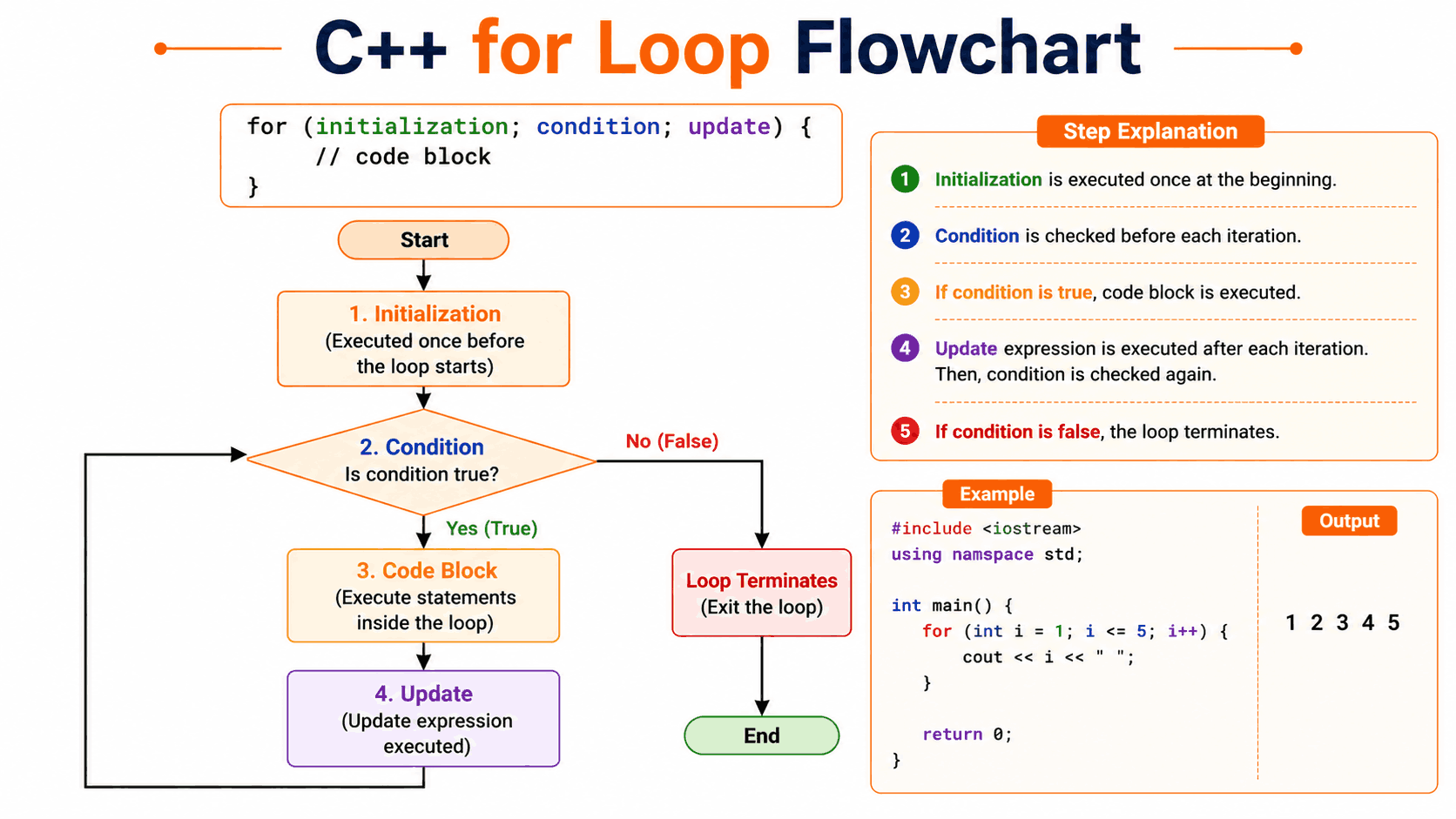
The for Loop in C++
The for loop is best used when you already know how many times you want to repeat a block of code. It packs the initialization, condition, and update step all into a single line, making it compact and easy to read.
Syntax
for (initialization; condition; update) {
    // code block
}- Initialization — runs once, before the loop starts (e.g., setting a counter)
- Condition — checked before every iteration; the loop continues while it's true
- Update — runs after every iteration (e.g., incrementing the counter)
Example 1: Printing Numbers 1 to 5
#include <iostream>
using namespace std;

int main() {
    for (int i = 1; i <= 5; i++) {
        cout << i << " ";
    }

    return 0;
}
Output:
1 2 3 4 5Example 2: Sum of First N Natural Numbers
#include <iostream>
using namespace std;

int main() {
    int n = 10;
    int sum = 0;

    for (int i = 1; i <= n; i++) {
        sum += i;
    }

    cout << "Sum: " << sum << endl;

    return 0;
}
Output:
Sum: 55Example 3: Printing a Multiplication Table
#include <iostream>
using namespace std;

int main() {
    int num = 5;

    for (int i = 1; i <= 10; i++) {
        cout << num << " x " << i << " = " << num * i << endl;
    }

    return 0;
}
Output:
5 x 1 = 5
5 x 2 = 10
5 x 3 = 15
...
Range-Based for Loop (C++11 and Later)
Modern C++ also offers a range-based for loop, ideal for iterating over containers like arrays and vectors without manually managing an index.
#include <iostream>
#include <vector>
using namespace std;

int main() {
    vector<int> numbers = {10, 20, 30, 40};

    for (int num : numbers) {
        cout << num << " ";
    }

    return 0;
}
Output:
10 20 30 40Flowchart of while loop
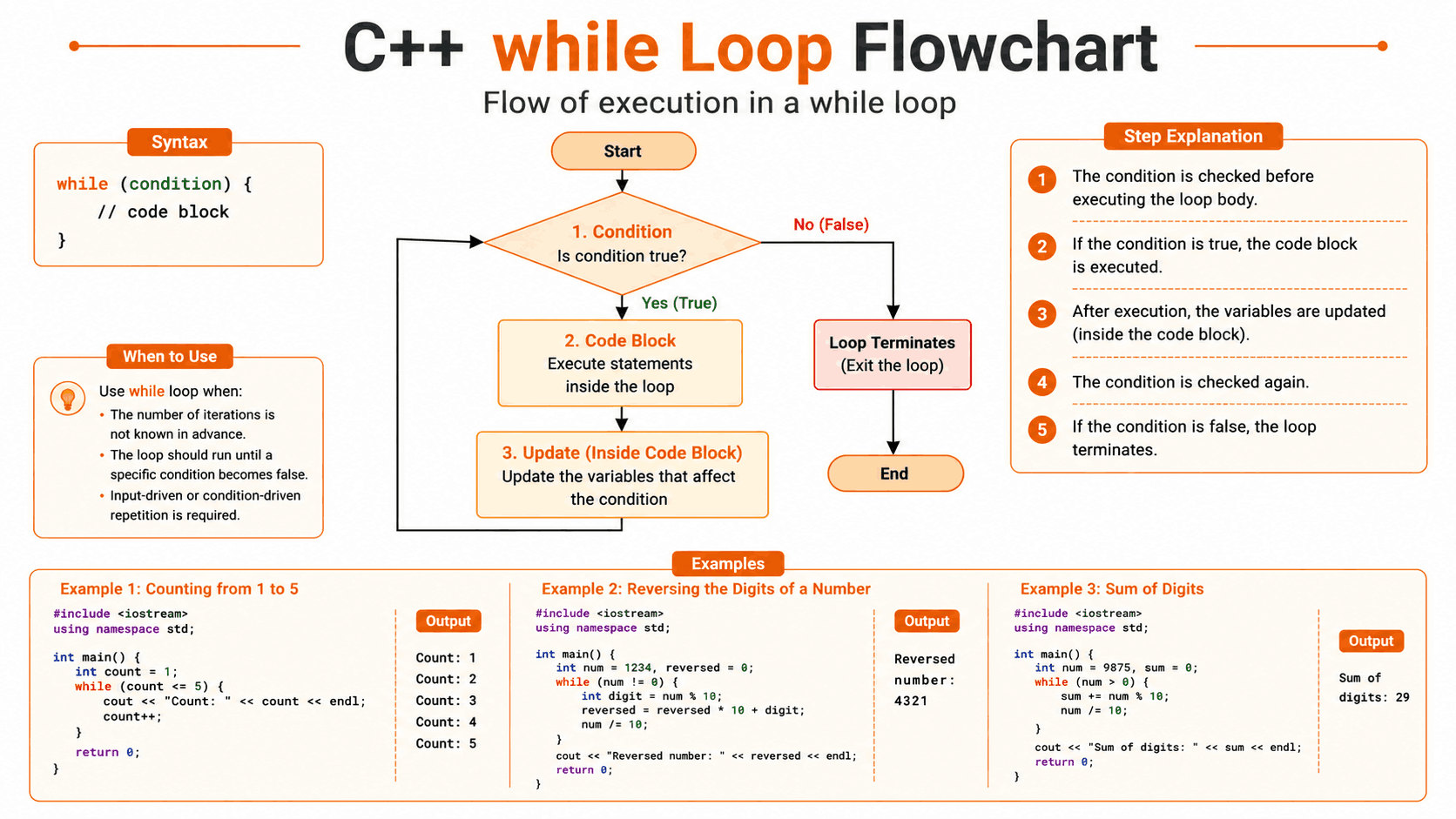
The while Loop in C++
The while loop is best used when the number of iterations is not known, and depends entirely on a condition. The condition is checked before each iteration, if it's false right from the start, the loop body never runs at all.
Syntax
while (condition) {
    // code block
}
Example 1: Counting from 1 to 5
#include <iostream>
using namespace std;

int main() {
    int count = 1;

    while (count <= 5) {
        cout << "Count: " << count << endl;
        count++;
    }

    return 0;
}
Output:
Count: 1
Count: 2
Count: 3
Count: 4
Count: 5
Example 2: Reversing the Digits of a Number
#include <iostream>
using namespace std;

int main() {
    int num = 1234;
    int reversed = 0;

    while (num != 0) {
        int digit = num % 10;
        reversed = reversed * 10 + digit;
        num /= 10;
    }

    cout << "Reversed number: " << reversed << endl;

    return 0;
}
Output:
Reversed number: 4321Example 3: Finding the Sum of Digits
#include <iostream>
using namespace std;

int main() {
    int num = 9875;
    int sum = 0;

    while (num > 0) {
        sum += num % 10;
        num /= 10;
    }

    cout << "Sum of digits: " << sum << endl;

    return 0;
}
Output:
Sum of digits: 29Note: Always make sure the loop condition eventually becomes false, for example, by updating a counter or variable inside the loop body. Forgetting this creates an infinite loop, one of the most common bugs beginners run into.
Flowchart of do while loop
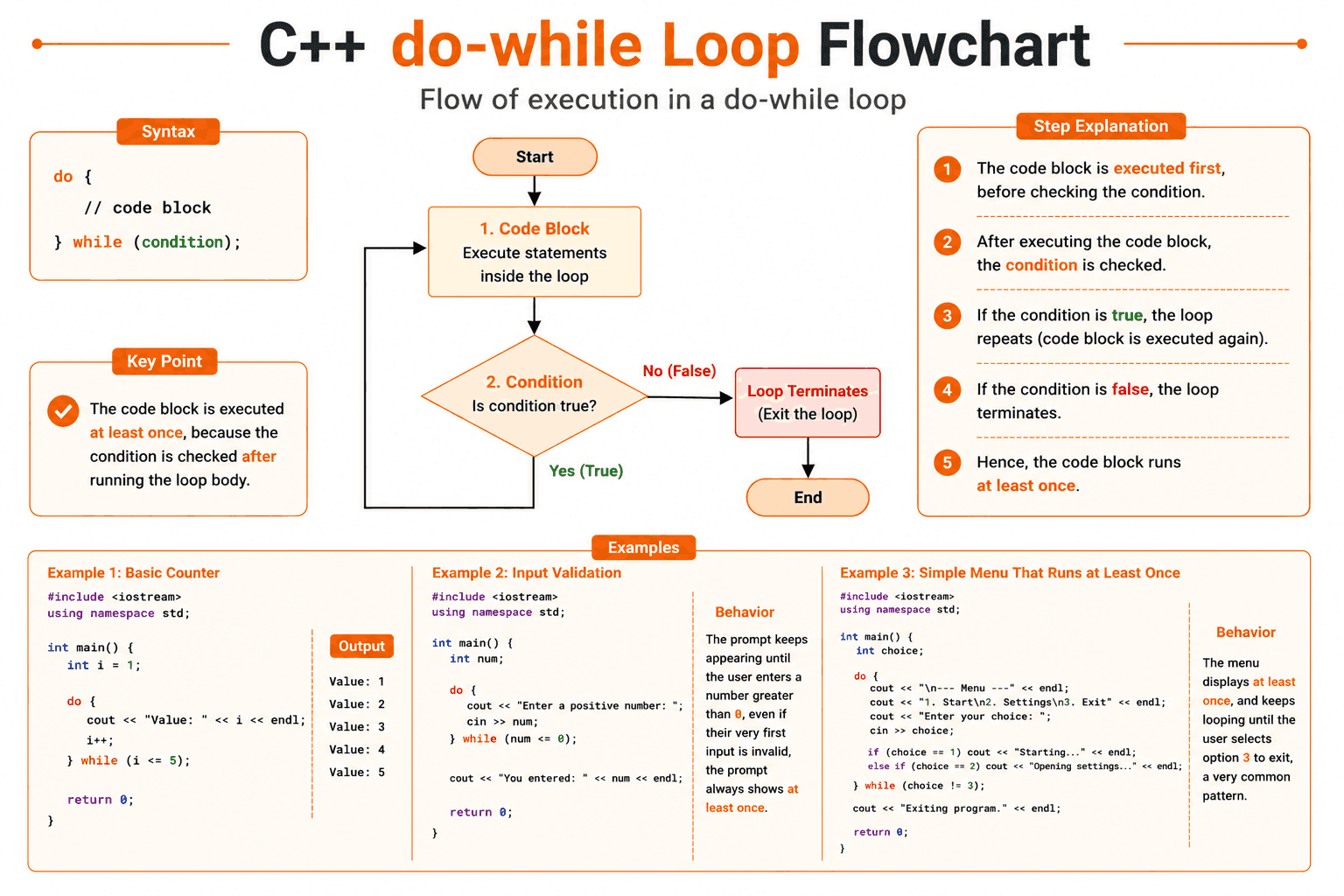
The do-while Loop in C++
The do-while loop works almost identically to the while loop, with one key difference: the condition is checked after the loop body runs. This guarantees the code inside executes at least once, no matter what.
Syntax
do {
    // code block
} while (condition);
Note: Note the semicolon at the end of the while condition, it's required and easy to forget.
Example 1: Basic Counter
#include <iostream>
using namespace std;

int main() {
    int i = 1;

    do {
        cout << "Value: " << i << endl;
        i++;
    } while (i <= 5);

    return 0;
}
Output:
Value: 1
Value: 2
Value: 3
Value: 4
Value: 5
Example 2: Input Validation
#include <iostream>
using namespace std;

int main() {
    int num;

    do {
        cout << "Enter a positive number: ";
        cin >> num;
    } while (num <= 0);

    cout << "You entered: " << num << endl;

    return 0;
}
Behavior: The prompt keeps appearing until the user enters a number greater than 0, even if their very first input is invalid, the prompt always shows at least once.
Example 3: Simple Menu That Runs at Least Once
#include <iostream>
using namespace std;

int main() {
    int choice;

    do {
        cout << "\n--- Menu ---" << endl;
        cout << "1. Start\n2. Settings\n3. Exit" << endl;
        cout << "Enter your choice: ";
        cin >> choice;

        if (choice == 1)
            cout << "Starting..." << endl;
        else if (choice == 2)
            cout << "Opening settings..." << endl;

    } while (choice != 3);

    cout << "Exiting program." << endl;

    return 0;
}
Behavior: The menu displays at least once, and keeps looping until the user selects option 3 to exit, a very common pattern.
Loop Control: break and continue
While not loops themselves, break and continue are used to stop or skip any loop in C++.
- break exits the loop immediately.
- continue skips the rest of the current iteration and moves to the next one.
#include <iostream>
using namespace std;

int main() {
    for (int i = 1; i <= 10; i++) {
        if (i == 3)
            continue; // skip 3

        if (i == 7)
            break;    // stop at 7

        cout << i << " ";
    }

    return 0;
}
Output:
1 2 4 5 6Quick Comparison: for vs while vs do-while
| Loop Type | Condition Checked | Guaranteed Execution | Best For |
|---|---|---|---|
| for | Before each iteration | No | Known number of iterations |
| while | Before each iteration | No | Unknown iterations, condition-driven |
| do-while | After each iteration | Yes (runs at least once) | Input validation, menus |
Conclusion
Loops are what let a C++ program scale beyond a list of hardcoded statements, they are the backbone of processing data, validating input, and automating repetitive tasks. Between the for loop for known iteration counts, the while loop for condition-driven repetition, and the do-while loop for guaranteed first-run execution, you now have all three core tools covered in this cpp tutorial.
The best way to make these concepts stick is to keep practicing: try rewriting a for loop as a while loop, add break and continue into your own examples, and experiment with nested loops. That kind of hands-on repetition is exactly what turns theory into real skill in any C++ tutorial or coding tutorials series.