Variable - C++ Tutorial
Last modified - 23-07-2026
Author - Krishna Shinde
What Is a Variable in C++?
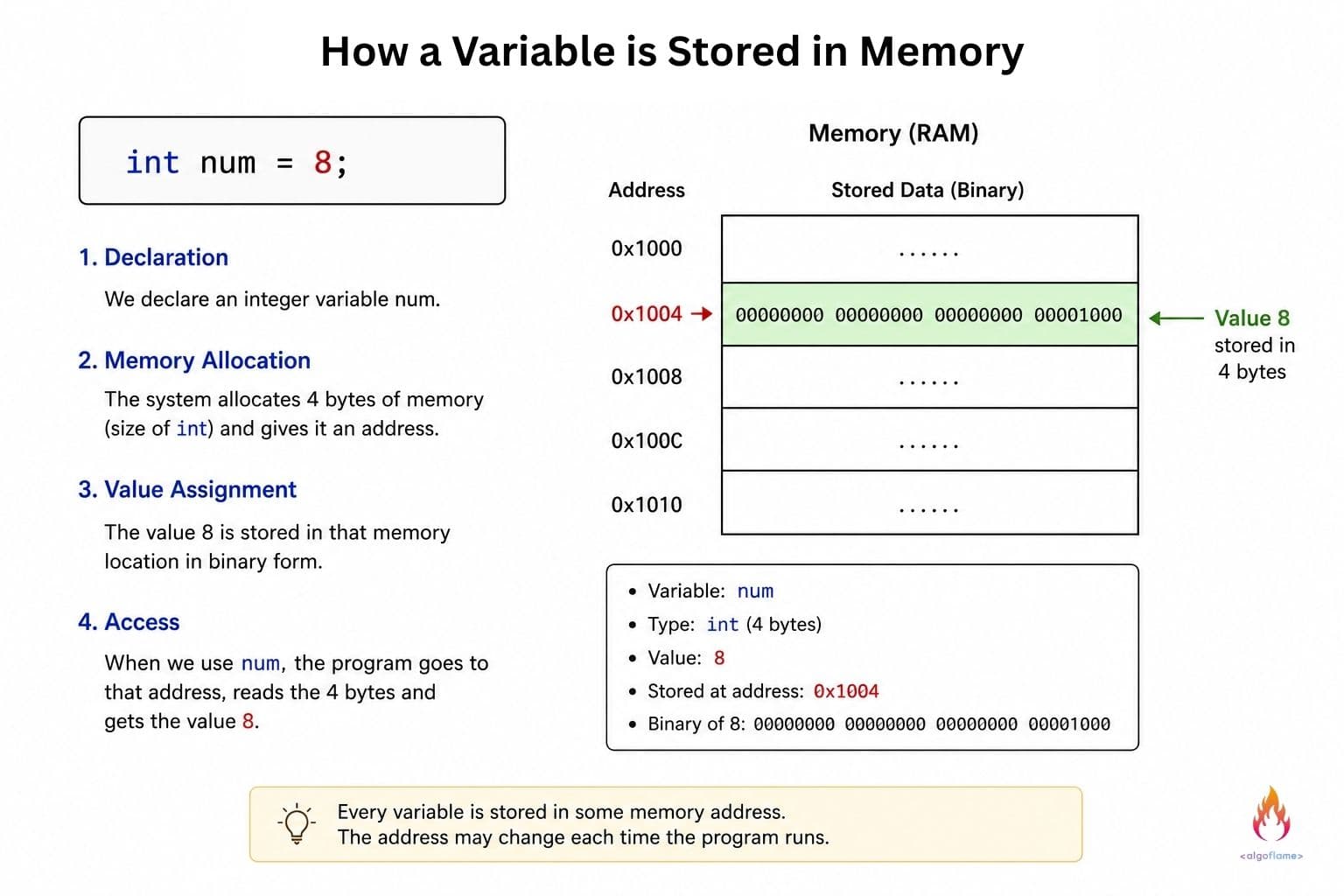
A variable is a container or named memory location that stores a value of specific type. Think of it as a labeled box: the label is the name of the variable, the size and shape of the box depend on its type, and the value whatever you put inside.
int age = 25;
Here, age is the label, int tells the compiler how big the box needs to be and how to store and its content, and 25 is the value stored inside.
Because C++ is statically typed, once you declare a variable's type, it can only store the value of the same data type for its lifetime.
In this C++ tutorial we will deep dive into variables.
Declaring and Initializing Variables in C++
To understand better we separate two concepts: declaration and initialization.
- 1. Declaration gives a data type and name to the variable
- 2. Initialization gives that variable its first value.
int x;        // declaration only — x holds an indeterminate (garbage) value
int y = 5;    // declaration + initialization
Before initialization the value stored in the variable is a Garbage value, it contains whatever value was already stored in that memory address. C++ doesn’t automatically initialize variables to 0 as it takes extra time. You are going to assign a value to the variable anyway, so initializing it first would be an unnecessary work.
Ways to Initialize a Variable in C++
C++ has multiple ways to initialize a variable:
int b(10);       // direct initialization
int c{10};        // brace (list) initialization — recommended in modern C++
int d{};          // brace initialization with no value — zero-initializes
Brace initialization () is recommended in modern C++ because it prevents narrowing conversions — for example, it will throw a compile error if you assign a double to an int without an explicit cast, whereas the other styles might silently truncate the value.
Declaring Multiple Variables at Once in C++
You can declare several variables of the same type in a single line:
int length = 10, width = 5, height = 2;
This is fine for variables which are going to be used for related operations, but avoid overusing it, one variable per line is often more readable, especially as your programs grow.
Naming Conventions of a Variable in C++
C++ has given some rules for naming a variable:
- 1) Names of variables can contain letters, digits, and underscores (_)
- 2) Names of variables cannot start with a digit
- 3) Names of variables are case-sensitive (algoflame and Algoflame are different variables)
- 4) Names cannot be a keyword (reserved words) (int, class, return, etc.)
int algoflame;      // valid
int _algoflame;      // valid
int 1algoflame;      // invalid — starts with a digit
int int;         // invalid — keyword
Good naming is always a matter of convention and better readability, here are some good practices of naming a variable:
- 1) Use descriptive names: algoFlame instead of ag
- 2) Common conventions: use camel case or snake case to name a variable.
- 3) Avoid single-letter names except for loop counters (i, j, k)
- 4) Constants are generally written in capital letters by convention.
Variable Scope in C++
Scope determines the lifespan of the variable and where you can access the variable.
Local Variables in C++
Declared inside a function or a block, local variables only exist within that block and are destroyed once the block ends.
void printSum() {
int _algoflame;
	int sum = 5 + 10; // local to this function
cout << sum;
}
// 'sum' no longer exists here
Global Variables in C++
Declared outside all the functions generally at the start of the program, global variables are accessible from anywhere in the file after their declaration, global variables are automatically initialized to 0 after declaration.
int globalCounter = 0; // global
void increment() {
	globalCounter++; // accessible here
}
Variable Shadowing in C++
Declaring a variable with the same name inside and outside the block can lead to the shadowing of the variable.
int value = 10;
void demo() {
	int value = 20; // shadows the outer 'value' within this scope
	cout << value; // prints 20, not 10
}
Most compilers will warn you about shadowing.
const and constexpr in C++
Sometimes you need a variable whose value cannot be changed once initialized.
const
The variable whose value cannot be changed once initialized is known as const, the value of the const is determined at run time. Const should be initialized during declaration.
const double pi = 3.14159;
// pi = 3.14; // compile error — can't modify a const variable
constexpr
Similar to const, but the values must be determined at compile time, which improves the performance of the program since the computation happens before the program runs.
constexpr int maxUsers = 100;
Rule of thumb: if you want that value of the variable to never change and it can be computed at compile time, prefer constexpr. If it's read-only value but depends on something only known at runtime (like user input), use const.
Storage Duration in C++
Beyond scope, variables also have a storage duration, how long they actually persists in memory.
Automatic
The default for local variables. Created when the block starts, destroyed when it ends.
Static
Declared with the static keyword. The variable retains its value between function calls instead of being recreated each time, static variables are automatically initialized to 0 after declaration.
void counter() {
	    static int count = 0; // initialized only once
	    count++;
	    std::cout << count;
}
Calling counter() repeatedly will print 1, 2, 3... instead of resetting to 1 every time, because count persists across calls.
Dynamic
Memory allocated manually at runtime using new (and released with delete). They must be accessed entirely through pointers.
// Allocation: Allocation of an integer on the heap
int* ptr = new int;

// Assignment: Direct assignment via pointer dereferencing
*ptr = 42;

cout << "Value: " << *ptr << endl; // Outputs 42

// Deallocation: Freeing the memory back to the heap
delete ptr;
C++ Variables - Common Mistakes
- Forgetting to initialize a variable : as covered above, this leaves it storing a garbage value, not zero.
- Variable shadowing : accidentally reusing a name in a nested scope which will show wrong value.
- Using keywords or invalid characters as names : using keywords as identifiers will throw an error.
Conclusion
Variables are how your program actually stores and manipulates the data types you learned about in our previous article. Getting comfortable with declaration vs. initialization, scope, and const/constexpr will set you up well for everything that follows, especially once you start working with functions, loops, and more complex programs where variable lifetime and scope really start to matter.
If you missed it, check out our C++ tutorial on C++ Data Types to see every type available and how they compare in size and range.