Functions in C++: The Complete C++ Tutorial
Last modified - 27-07-2026
Author - Krishna Shinde
If you're searching for a C++ tutorial to master one of the most important concepts in programming, you have landed in the right place. Functions in C++ are the backbone of every well-structured program, and understanding them deeply is a must for someone who wants to become C++ developer.
This C++ language tutorial covers everything about functions - from the absolute basics to advanced topics like recursion, function overloading, and inline functions — with clear explanations and hands-on code examples. Whether you're just starting out or brushing up your fundamentals, this cpp tutorial will give you a complete, practical understanding of how functions work.
Table of Contents
- What is a Function in C++?
- Importance of Function in C++
- Syntax of a Function in C++
- Function Declaration vs Definition in C++
- Parameters vs Arguments of a Function
- Types of Functions Based on Return Value and Parameters
- Void Functions in C++
- Default Arguments of a Function in C++
- Function Overloading
- Recursion in C++
- Inline Functions in C++
- Scope and Lifetime of Variables in Functions
- Best Practices for Writing Functions in C++
- Conclusion
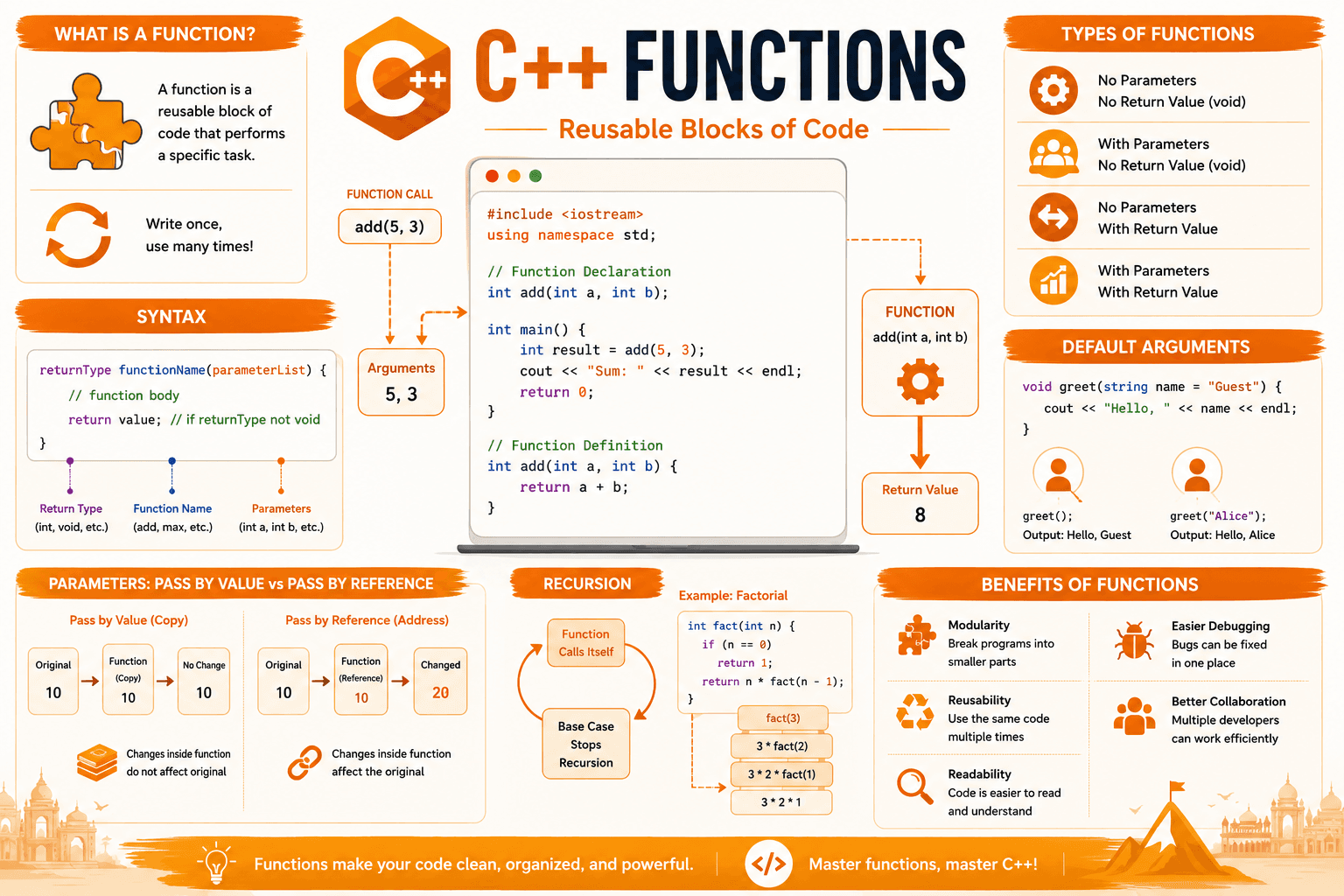
What is a Function in C++?
In the world of programming, functions are one of the very first concepts every learner encounters — and for good reason. A function is a reusable block of code that performs a specific task. Once written, a function can be called (executed or invoked) as many times as needed, from anywhere in your program, without rewriting the same logic over and over.
Every C++ program has at least one function: main(), the entry point where execution begins. Understanding main() is the first step in C++ language.
#include <iostream>
using namespace std;

int main() {
    cout << "Hello, World!" << endl;
    return 0;
}
Output:
Hello, World!Here, main() is itself a function — C++ automatically invokes it the moment your program starts running.
Importance of Function in C++
No C++ tutorial is complete without a deep dive into functions, because they solve real, everyday programming problems:
- Reusability — Write the logic once, use it as many times as you need.
- Modularity — Break large, complex programs into smaller, manageable pieces.
- Readability — Well-named functions make code self-explanatory, even to someone reading it for the first time.
- Easier debugging and testing — Each function can be tested in isolation.
- Team collaboration — Multiple developers can work on different functions of the same project without stepping on each other's code.
If you're following coding tutorials to build real-world software, mastering functions early will save you countless hours down the line.
Syntax of a Function in C++
Every function in C++ itself — is built from four essential parts:
returnType functionName(parameterList) {
    // function body
    return value; // required if returnType is not void
}
Here's a practical example:
#include <iostream>
using namespace std;

int add(int a, int b) {
    int sum = a + b;
    return sum;
}

int main() {
    int result = add(5, 3);
    cout << "Sum: " << result << endl;
    return 0;
}
Output:
Sum: 8- Return type (int) — the data type of the value the function sends back.
- Function name (add) — the identifier used to call the function elsewhere in your code.
- Parameters (int a, int b) — placeholders that receive values when the function is called.
- Function body — the block of code that runs, including the return statement.
Function Declaration vs Definition in C++
A key concept in any C++ language tutorial is understanding that a function's declaration (or prototype) can be separated from its definition. This is especially useful in larger projects or when splitting code across multiple files.
#include <iostream>
using namespace std;

// Function declaration (prototype)
int add(int a, int b);

int main() {
    cout << "Sum: " << add(4, 6) << endl;
    return 0;
}

// Function definition
int add(int a, int b) {
    return a + b;
}
Output:
Sum: 10The declaration tells the compiler that the function exists and describes its signature, allowing you to call it in main() before the full definition appears later in the file. This pattern is standard practice in real-world C++ projects using header (.h) and source (.cpp) files.
Parameters vs Arguments of a Function
These terms are often used loosely, but in any solid cpp tutorial, it's worth getting them right:
- Parameter — the variable listed in the function's definition (e.g., int a in int add(int a, int b)).
- Argument — the actual value passed to the function when it's called (e.g., 5 in add(5, 3)).
int multiply(int x, int y) { // x and y are parameters
    return x * y;
}

int main() {
    int result = multiply(4, 7); // 4 and 7 are arguments
    return 0;
}
This distinction becomes especially important when you move on to topics like pass by value and pass by reference, since those concepts describe exactly how arguments connect to parameters during a function call.
Types of Functions Based on Return Value and Parameters
In this c++ tutorial, it helps to categorize functions into four common patterns:
1. No parameters, no return value
void sayHello() {
    cout << "Hello!" << endl;
}
2. Parameters, no return value
void greet(string name) {
    cout << "Hello, " << name << "!" << endl;
}
3. No parameters, with return value
int getFavoriteNumber() {
    return 7;
}
4. Parameters, with return value
int square(int num) {
    return num * num;
}
Void Functions in C++
A void function performs an action but doesn't return any value. It's used when you simply want a function to do something, like printing output or modifying a variable, without needing a result back. This is a common early topic in most coding tutorials.
#include <iostream>
using namespace std;

void printStars(int count) {
    for (int i = 0; i < count; i++) {
        cout << "*";
    }
    cout << endl;
}

int main() {
    printStars(5);
    return 0;
}
Output:
*****You can still use return; (without a value) inside a void function to exit early if needed.
Default Arguments of a Function in C++
C++ allows you to assign default values to function parameters. If the caller doesn't provide an argument for that parameter, the default value is used automatically.
#include <iostream>
using namespace std;

void displayMessage(string message = "Welcome to C++!") {
    cout << message << endl;
}

int main() {
    displayMessage();                  // Uses default value
    displayMessage("Custom message");  // Overrides default
    return 0;
}
Output:
Welcome to C++!
Custom message
Rule: Default arguments must be assigned from right to left. Once you give a parameter a default value, every parameter to its right must also have a default value.
// Valid
void func(int a, int b = 10, int c = 20);

// Invalid - d has no default but comes after c which has one
void func(int a, int b, int c = 20, int d);
Function Overloading
Function overloading lets you define multiple functions with the same name but different parameter lists (different numbers or types of parameters). C++ automatically determines which version to call based on the arguments you provide.
#include <iostream>
using namespace std;

int add(int a, int b) {
    return a + b;
}

double add(double a, double b) {
    return a + b;
}

int add(int a, int b, int c) {
    return a + b + c;
}

int main() {
    cout << add(2, 3) << endl;         // Calls int version
    cout << add(2.5, 3.5) << endl;     // Calls double version
    cout << add(1, 2, 3) << endl;      // Calls three-parameter version
    return 0;
}
Output:
5
6
6
Function overloading is useful when you want the same operation to work with different data types or numbers of inputs, without inventing separate function names like addInts() or addDoubles().
Recursion in C++
A recursive function is one that calls itself to solve a problem by breaking it into smaller sub-problems. Every recursive function needs a base case to stop the recursion — otherwise, it will run indefinitely and cause a stack overflow.
#include <iostream>
using namespace std;

int factorial(int n) {
    if (n == 0) {       // Base case
        return 1;
    }
    return n * factorial(n - 1); // Recursive call
}

int main() {
    cout << "Factorial of 5: " << factorial(5) << endl;
    return 0;
}
Output:
Factorial of 5: 120Here's how the recursion unfolds step by step:
factorial(5) = 5 * factorial(4)
factorial(4) = 4 * factorial(3)
factorial(3) = 3 * factorial(2)
factorial(2) = 2 * factorial(1)
factorial(1) = 1 * factorial(0)
factorial(0) = 1  (base case)
Recursion is powerful for problems like tree traversal, searching, sorting, and mathematical sequences (like Fibonacci), though it can be less efficient than loops for simple repetitive tasks due to function call overhead.
Inline Functions in C++
An inline function is a hint to the compiler to insert the function's code directly at the point where it's called, instead of performing a standard function call. This can reduce overhead for small, frequently used functions.
#include <iostream>
using namespace std;

inline int square(int x) {
    return x * x;
}

int main() {
    cout << square(5) << endl;
    return 0;
}
Output:
25Keep in mind that inline is only a suggestion to the compiler — modern compilers often decide independently whether inlining is beneficial. Inline functions work best for small, simple operations, not large or recursive ones.
Scope and Lifetime of Variables in Functions
Variables declared inside a function are called local variables. They exist only within that function and are destroyed the moment the function finishes executing.
#include <iostream>
using namespace std;

void demoFunction() {
    int localVar = 100; // Local to demoFunction
    cout << "Inside function: " << localVar << endl;
}

int main() {
    demoFunction();
    // cout << localVar; // Error: localVar is not accessible here
    return 0;
}
Output:
Inside function: 100This is exactly why returning a reference or pointer to a local variable is dangerous — the variable no longer exists once the function returns, resulting in undefined behavior.
Best Practices for Writing Functions in C++
- Keep functions short and focused — each function should ideally do one thing well.
- Use meaningful names — calculateTotalPrice() is far more descriptive than func1().
- Limit the number of parameters — too many parameters make functions harder to read and reuse.
- Prefer const correctness — mark parameters const when a function shouldn't modify them.
- Always initialize return values — this avoids undefined behavior from uninitialized variables.
- Document your functions — brief comments describing a function's purpose, parameters, and return value save time for future readers, including yourself.
Following these best practices consistently is what separates beginner code from production-quality code — a theme that runs through nearly every advanced c++ tutorial.
Conclusion
Functions in C++ are the foundation of structured, maintainable programming. They let you break complex problems into small, reusable, testable pieces of logic — making your code cleaner, easier to debug, and far less error-prone.
In this c++ language tutorial, you learned:
- The basic structure of a function in C++
- The difference between function declaration and definition
- Parameters vs arguments
- Void functions and default arguments
- Function overloading
- Recursion and inline functions
- Variable scope inside functions
If you found this cpp tutorial helpful, the natural next step in your learning journey is understanding how arguments are passed to functions — specifically the difference between pass by value and pass by reference — since this concept directly affects how your functions interact with data and influences performance in real-world C++ applications. Keep exploring more coding tutorials to build a strong, practical foundation in C++.