OOP in C++: Classes, Objects and Constructors
Last modified - 31-07-2026
Author - Krishna Shinde
If you've worked in C++ on variables, loops, and functions, the next big shift in your coding journey is Object Oriented Programming, or OOP. This is the point where C++ stops feeling like a list of instructions and starts feeling like you're modeling real things — a bank account, a car, a student record — as code.
This cpp tutorial covers the three ideas you need to get started with OOP in C++: classes, objects, and constructors. Each one is explained in plain words first, then shown with a runnable example so you can see exactly how it behaves.
By the end of this C++ tutorial, you'll be able to write your own classes, create objects from them, and understand what a constructor actually does and why it matters.
Table of Contents
1. What Is a Class in C++?
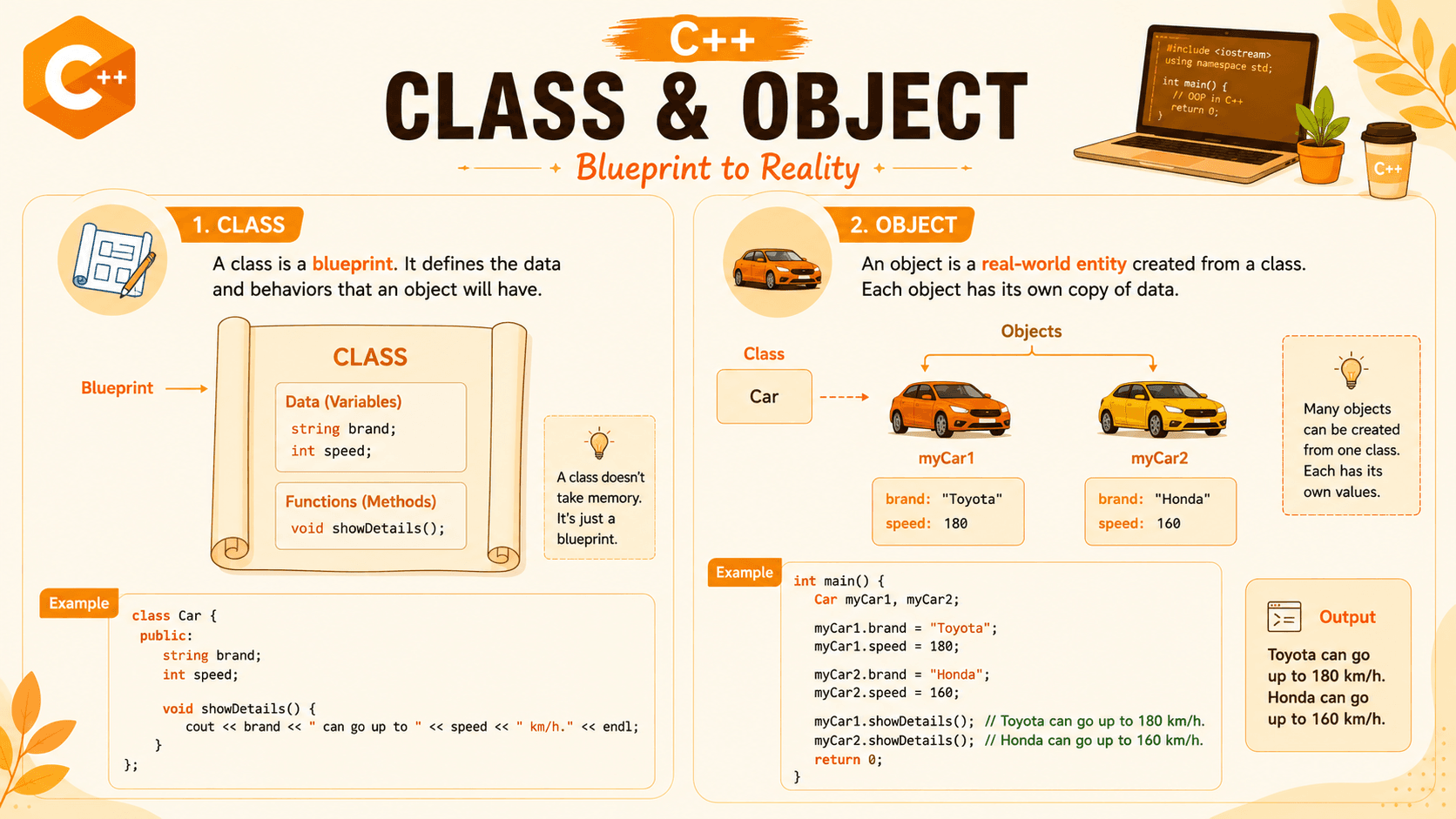
A class is a blueprint. It doesn't do anything by itself — it just describes what something should look like and what it should be able to do. Think of a class like the blueprint for a house: the blueprint isn't a house you can live in, but it tells you exactly how to build one.
In C++, a class groups together data (called member variables) and functions that work on that data (called member functions or methods).
Syntax:
class ClassName {
    // member variables (data)
    // member functions (behavior)
};
Example: A Simple Car Class
#include <iostream>
using namespace std;

class Car {
public:
    string brand;
    int speed;

    void showDetails() {
        cout << brand << " can go up to " << speed << " km/h." << endl;
    }
};

int main() {
    Car myCar;
    myCar.brand = "Toyota";
    myCar.speed = 180;
    myCar.showDetails();
    return 0;
}
Output:
Toyota can go up to 180 km/h.2. What Is an Object in C++?
If a class is the blueprint, an object is the actual thing built from that blueprint. You can create as many objects as you want from a single class, and each one gets its own copy of the member variables.
In the example above, myCar is an object of the Car class. Once it exists, you can access its data and functions using the dot (.) operator, like myCar.brand or myCar.showDetails().
Example: Creating Multiple Objects from One Class
#include <iostream>
using namespace std;

class Student {
public:
    string name;
    int marks;
};

int main() {
    Student s1, s2;

    s1.name = "Aisha";
    s1.marks = 88;

    s2.name = "Raj";
    s2.marks = 74;

    cout << s1.name << " scored " << s1.marks << endl;
    cout << s2.name << " scored " << s2.marks << endl;

    return 0;
}
Output:
Aisha scored 88
Raj scored 74
Notice how s1 and s2 are both Student objects, but each one holds its own separate name and marks. That's the whole point of a class — one blueprint, many independent objects.
3. Access Specifiers: public and private
Access specifiers control which parts of a class can be reached from outside it. The two you'll use constantly as a beginner are:
- public — member variables and functions can be accessed from anywhere the object is visible.
- private — member variables and functions can only be accessed from inside the class itself. This is used to protect data from being changed carelessly, a practice known as encapsulation.
Example: Using private to Protect Data
#include <iostream>
using namespace std;

class Account {
private:
    double balance;

public:
    void setBalance(double amount) {
        if (amount >= 0) {
            balance = amount;
        }
    }

    void showBalance() {
        cout << "Balance: " << balance << endl;
    }
};

int main() {
    Account acc;
    acc.setBalance(5000);
    acc.showBalance();
    return 0;
}
Output:
Balance: 5000Here, balance can't be set directly from main() — trying acc.balance = 5000; would fail to compile. It can only be changed through setBalance(), which lets us control what values are allowed. That's the value of keeping data private.
Besides public and private, C++ has a third access specifier: protected. It behaves almost exactly like private — member variables and functions marked protected cannot be accessed from outside the class using the dot operator.
The difference only shows up with inheritance: a private member is invisible even to a class that inherits from it, but a protected member can be accessed by that derived (child) class.
4. Constructors in C++
A constructor is a special function that runs automatically the moment an object is created. Its job is to set up the object — usually by giving initial values to its member variables — so you don't have to do it manually every time.
A constructor always has the exact same name as the class, and it has no return type, not even void.
4.1 Default Constructor
A default constructor takes no parameters. If you don't write any constructor yourself, C++ quietly provides an empty one for you. But you can also write your own to set starting values.
#include <iostream>
using namespace std;

class Robot {
public:
    string name;

    // default constructor
    Robot() {
        name = "Unnamed";
        cout << "Robot created." << endl;
    }
};

int main() {
    Robot r1;
    cout << r1.name << endl;
    return 0;
}
Output:
Robot created.
Unnamed
4.2 Parameterized Constructor
A parameterized constructor accepts arguments, so you can give each object different starting values right when it's created, instead of setting them one by one afterward.
#include <iostream>
using namespace std;

class BankAccount {
public:
    string owner;
    double balance;

    // parameterized constructor
    BankAccount(string ownerName, double startingBalance) {
        owner = ownerName;
        balance = startingBalance;
    }

    void showAccount() {
        cout << owner << "'s balance: " << balance << endl;
    }
};

int main() {
    BankAccount acc1("Meera", 12000);
    BankAccount acc2("Dev", 5400);

    acc1.showAccount();
    acc2.showAccount();

    return 0;
}
Output:
Meera's balance: 12000
Dev's balance: 5400
This is the constructor pattern you'll use the most in real code. Every BankAccount object is guaranteed to start with a valid owner and balance, because there's no way to create one without providing both.
4.3 Copy Constructor
A copy constructor creates a new object by copying the values from an existing object of the same class. C++ generates one automatically, but it's worth knowing what it looks like and when it runs.
#include <iostream>
using namespace std;

class Point {
public:
    int x, y;

    Point(int a, int b) {
        x = a;
        y = b;
    }

    // copy constructor
    Point(const Point &source) {
        x = source.x;
        y = source.y;
    }
};

int main() {
    Point p1(3, 7);
    Point p2 = p1;   // copy constructor runs here

    cout << "p2: (" << p2.x << ", " << p2.y << ")" << endl;
    return 0;
}
Output:
p2: (3, 7)p2 gets its own independent copy of x and y. If you changed p2.x afterward, p1.x would stay exactly the same, because they're two separate objects in memory.
5. Putting It Together: A Real BankAccount Example
Here's a slightly fuller version that combines everything above — a class, private data, a parameterized constructor, and public functions to interact with it safely.
#include <iostream>
using namespace std;

class BankAccount {
private:
    string owner;
    double balance;

public:
    BankAccount(string ownerName, double startingBalance) {
        owner = ownerName;
        balance = startingBalance;
    }

    void deposit(double amount) {
        balance += amount;
    }

    void withdraw(double amount) {
        if (amount <= balance) {
            balance -= amount;
        } else {
            cout << "Insufficient funds." << endl;
        }
    }

    void showAccount() {
        cout << owner << "'s balance: " << balance << endl;
    }
};

int main() {
    BankAccount acc("Kabir", 10000);
    acc.deposit(2500);
    acc.withdraw(4000);
    acc.showAccount();
    return 0;
}
Output:
Kabir's balance: 8500Notice that main() never touches balance directly — it only calls deposit(), withdraw(), and showAccount(). The constructor guarantees the account starts in a valid state, and the private data stays protected from accidental misuse. This pattern — private data, a constructor to initialize it, and public functions to work with it — is the core habit that carries through the rest of OOP in C++.
Quick Comparison: Constructor Types in C++
| Constructor Type | Best Used When |
|---|---|
| Default constructor | You want every object to start with the same fixed initial values. |
| Parameterized constructor | Each object needs its own custom starting values, supplied at creation. |
| Copy constructor | You need a new, independent object that starts as a duplicate of an existing one. |
Conclusion
Classes, objects, and constructors are the starting point of Object-Oriented Programming, and getting comfortable with them is essential in any C++ tutorial that moves beyond basic syntax. You've now seen a class act as a blueprint, objects created from that blueprint, and constructors that set objects up correctly the moment they're born.
Keep practicing by writing your own classes: model a Book, a Movie, or a simple Student record, and give each one a constructor. That kind of hands-on repetition is exactly what makes concepts stick in coding tutorials, and it sets you up well for the rest of your C++ language tutorial journey — including inheritance, polymorphism, and beyond.