Structure of a Java Program (Explained Properly)
Last modified - 23-01-2026
Author - Krishna Shinde
If you don’t understand the structure of a Java program, everything else you write in Java is guesswork. Most tutorials treat it like a syntax checklist. That’s wrong. The structure exists because of how Java executes code, not because of arbitrary rules.
Let’s break it down line by line, with purpose—not memorization.
Basic Structure of a Java Program
A minimal Java program looks like this:
package com.algoflame.demo;

import java.util.Scanner;

public class Main {

    public static void main(String[] args) {
        System.out.println("Hello, Java");
    }

}
This is not random. Every part exists for a reason.
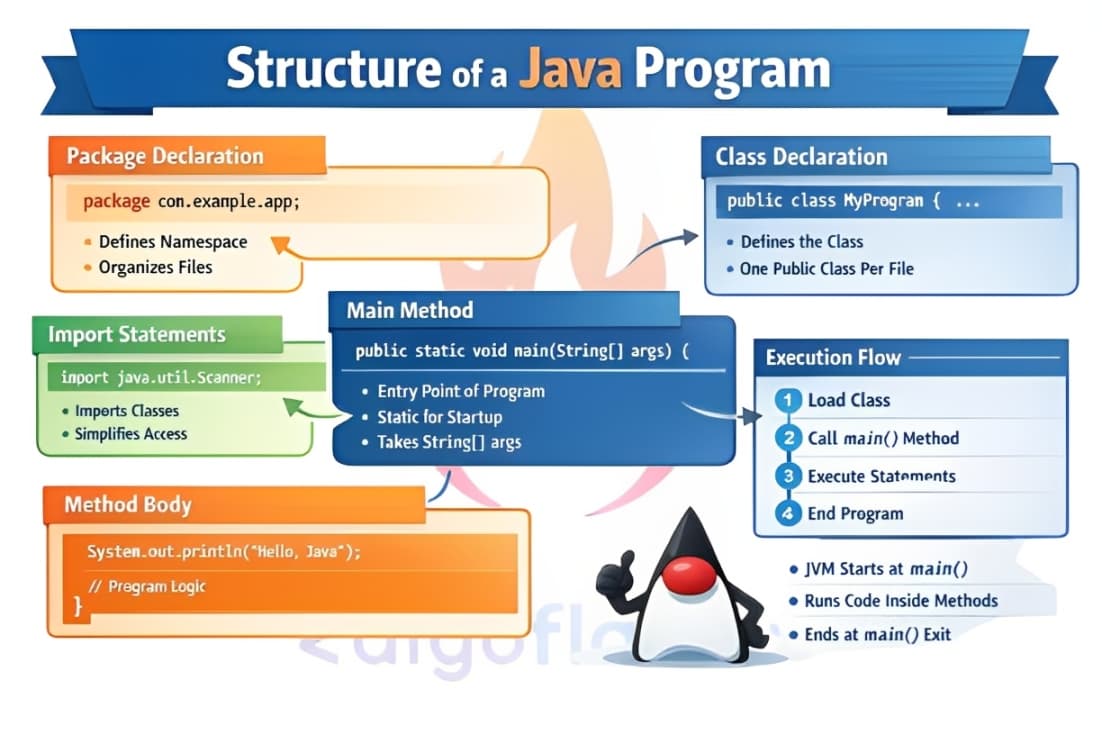
1. Package Declaration
package com.algoflame.demo;What Package does in Java
- Defines the namespace of your class
- Prevents class name conflicts
- Maps directly to folder structure
Rules of adding package
- Package name should be in lowercase letters
- Must be the first line (if present)
- Package name should be unique
- Package name should be descriptive
2. Import Statements
import java.util.Scanner;What Import does in Java
- Allows access to classes defined in other packages
- Saves you from writing fully qualified names
Without imports:
java.util.Scanner sc = new java.util.Scanner(System.in);With imports:
Scanner sc = new Scanner(System.in);Rules of Import
- Import statements must be placed after the package declaration
- Import statements must be placed before the class declaration
- Import statements are case-sensitive
- Can import single classes or entire packages
- java.lang is imported automatically (String, System, Math)
Common beginner mistake
Blindly importing everything. That hides dependencies and hurts readability.
3. Class Declaration
public class Main {Why Java forces classes
Java is class-centric by design. There is no executable code outside a class-period.
Rules of Declaring Classes in Java
- Every Java program has at least one class
- File name must match the public class name
- Only one public class per file
4. Main Method (Entry Point)
public static void main(String[] args)This is where the JVM starts execution.
Breaking it down:
- public: Accessible from anywhere
- static: No object needed to run the program
- void: Does not return any value
- main: The name the JVM looks for as the starting point
- (String[] args): Accepts command-line arguments as an array of Strings
Why main method in Java is static
The main method is static because it needs to be called by the JVM without creating an instance of the class. This allows the program to start executing without any prior object creation.
5. Method Body (Executable Statements)
System.out.println("Hello, Java");This is where you write the code that runs when the program starts.
Key rule
Java executes code top to bottom, inside methods only.
If code isn’t inside a method → compile-time error.
6. Braces - The Real Structure
Braces define scope, not decoration.
class A {
    void method() {
        // scope
    }
}
}
Why Braces Matter in Java
- Define where classes and methods begin and end
- Control variable scope and lifetime
- Essential for code organization and readability
Execution Flow of a Java Program
- JVM loads the class
- JVM looks for main()
- Execution starts inside main()
- Objects and methods execute as needed
- Program exits when main() finishes
Why Java’s Structure Is Strict (And Why That’s Good)
Java enforces structure to:
- Catch errors early
- Scale codebases safely
- Make behavior predictable
Conclusion
The structure of a Java program is not ceremonial—it’s architectural.
If you truly understand:
- Classes and methods
- Execution flow
- Braces and scope
You stop writing Java like a beginner and start writing it like an engineer.
Frequently Asked Questions (FAQ) - Java Program Structure
Here are some Frequently asked questions about Java program structure:
Where does Java program Execution start?
Execution always begins from the main() method. The JVM loads the class, searches specifically for:
public static void main(String[] args)And starts executing code from there.
Is the package declaration optional in Java?
Yes, package declarations are optional in Java. If no package is declared, the class belongs to the default package.
Can a Java program have multiple classes?
Yes, a Java program can have multiple classes. However, only one public class is allowed per file, and the file name must match that public class name.
Can Java execute code outside a class or method?
No, Java requires all executable code to be inside a class and method. Code must be enclosed within a method body or a static block within a class.