Pass by Value vs Pass by Reference in C++
Last modified - 28-07-2026
Author - Krishna Shinde
When you write functions in C++, one of the most important decisions you'll make is how to pass arguments into them. Do you pass a copy of the data, or do you pass access to the original data? This single choice affects your program's performance, memory usage, and correctness.
In this C++ tutorial, we'll break down pass by value and pass by reference in C++, explain how each works under the hood, and walk through practical code examples so you know exactly when to use which.
Table of Contents
What Does Passing Arguments Mean in C++?
When you call a function, you supply it with arguments. C++ needs to decide how those arguments are made available inside the function body. There are three main mechanisms:
- Pass by value — the function receives a copy of the argument.
- Pass by reference — the function receives an alias to the original variable.
- Pass by pointer — the function receives the memory address of the variable.
Understanding the difference is critical because it determines whether changes made inside a function affect the original data outside the function.
Pass by Value Explained
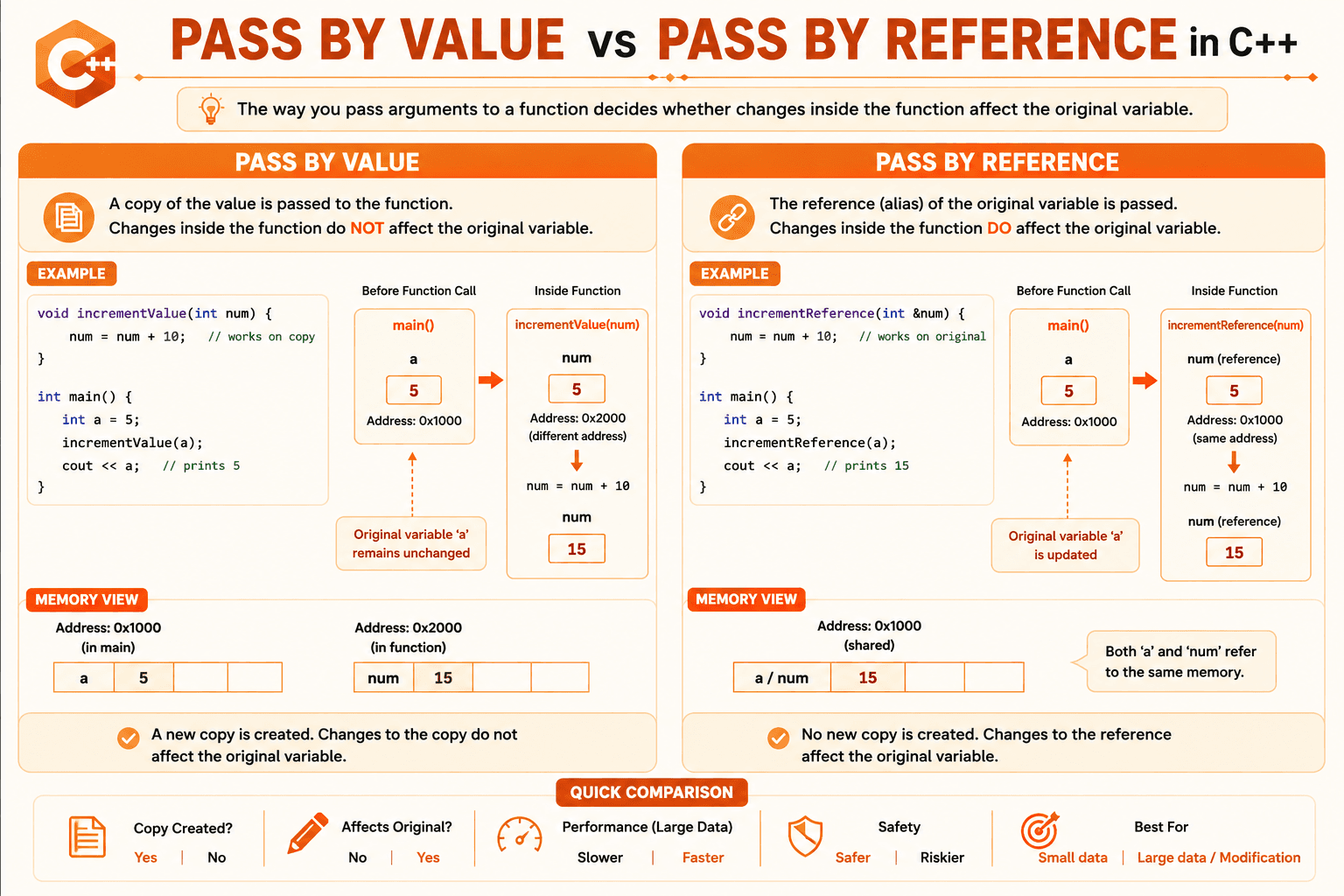
In pass by value, C++ creates a brand-new copy of the argument and passes that copy to the function. Any modification made to the parameter inside the function has no effect on the original variable.
Example: Pass by Value
#include <iostream>
using namespace std;

void incrementValue(int num) {
    num = num + 10;
    cout << "Inside function (by value): " << num << endl;
}

int main() {
    int a = 5;
    incrementValue(a);
    cout << "Outside function (original): " << a << endl;
    return 0;
}
Output:
Inside function (by value): 15
Outside function (original): 5
Notice that a remains 5 even after calling incrementValue(a). That's because num inside the function is a separate copy stored at a different memory address.
Key Characteristics of Pass by Value
- A new copy of the variable is created in memory.
- Changes inside the function do not affect the caller's variable.
- Safer, since the original data is protected from accidental modification.
- Can be slower and more memory-intensive for large objects (like big structs, vectors, or strings), because copying takes time and space.
Pass by Reference Explained
In pass by reference, instead of copying the value, the function receives a reference — essentially an alias — to the original variable. Any change made to the parameter directly affects the original variable.
In C++, you create a reference parameter using the & symbol.
Example: Pass by Reference
#include <iostream>
using namespace std;

void incrementReference(int &num) {
    num = num + 10;
    cout << "Inside function (by reference): " << num << endl;
}

int main() {
    int a = 5;
    incrementReference(a);
    cout << "Outside function (original): " << a << endl;
    return 0;
}
Output:
Inside function (by reference): 15
Outside function (original): 15
This time, a becomes 15 because num is not a copy — it's another name for a itself. Modifying num modifies a directly.
Key Characteristics of Pass by Reference
- No copy is made; the function works directly on the original data.
- Changes inside the function do affect the caller's variable.
- More memory-efficient for large data structures since nothing is duplicated.
- Slightly riskier, since the function can unintentionally modify the caller's data if you're not careful.
Pass by Pointer
C++ also allows passing by pointer, which is similar to pass by reference but uses explicit memory addresses and the * and & operators.
#include <iostream>
using namespace std;

void incrementPointer(int *num) {
    *num = *num + 10;
    cout << "Inside function (by pointer): " << *num << endl;
}

int main() {
    int a = 5;
    incrementPointer(&a);
    cout << "Outside function (original): " << a << endl;
    return 0;
}
Output:
Inside function (by pointer): 15
Outside function (original): 15
Pointers achieve the same result as references but require explicit dereferencing (*num) and address-of operators (&a). References are generally preferred in modern C++ because they are safer and easier to read, but pointers are still essential when you need to represent "no value" (using nullptr) or work with dynamic memory.
Pass by Value vs Pass by Reference: Side-by-Side Example
Let's use a classic example — swapping two numbers — to clearly show the difference. This kind of hands-on comparison is a staple in most coding tutorials, because seeing both versions side by side makes the concept click faster than any explanation alone.
Swap Using Pass by Value (Doesn't Work as Expected)
#include <iostream>
using namespace std;

void swapByValue(int x, int y) {
    int temp = x;
    x = y;
    y = temp;
}

int main() {
    int a = 10, b = 20;
    swapByValue(a, b);
    cout << "a = " << a << ", b = " << b << endl;
    return 0;
}
Output:
a = 10, b = 20The values remain unchanged in main() because x and y were only local copies.
Swap Using Pass by Reference (Works Correctly)
#include <iostream>
using namespace std;

void swapByReference(int &x, int &y) {
    int temp = x;
    x = y;
    y = temp;
}

int main() {
    int a = 10, b = 20;
    swapByReference(a, b);
    cout << "a = " << a << ", b = " << b << endl;
    return 0;
}
Output:
a = 20, b = 10This time the swap actually works, because x and y refer directly to a and b.
Pass by Const Reference
Sometimes you want the efficiency of pass by reference (no copying) but without allowing the function to modify the original data. That's where const reference comes in.
#include <iostream>
#include <string>
using namespace std;

void printMessage(const string &message) {
    cout << "Message: " << message << endl;
    // message = "Changed"; // This would cause a compile-time error
}

int main() {
    string greeting = "Hello, World!";
    printMessage(greeting);
    return 0;
}
Here, message is passed by reference (so no expensive string copy is made), but the const keyword prevents the function from modifying it. This gives you the best of both worlds: performance of reference passing with the safety of value passing.
This pattern is extremely common in professional C++ code, especially when passing large objects like std::string, std::vector, or custom classes.
Performance Comparison
For small data types like int, char, float, or bool, pass by value and pass by reference perform almost identically — the copy is cheap.
For large data types like std::vector, std::string, or custom classes/structs, the difference becomes significant.
#include <iostream>
#include <vector>
using namespace std;

// Inefficient: copies the entire vector
void processByValue(vector<int> data) {
    cout << "Vector size: " << data.size() << endl;
}

// Efficient: no copying, works on original data
void processByReference(const vector<int> &data) {
    cout << "Vector size: " << data.size() << endl;
}

int main() {
    vector<int> numbers(1000000, 1); // A vector with 1 million elements

    processByValue(numbers);      // Copies 1 million integers
    processByReference(numbers);  // No copying at all

    return 0;
}
When processByValue() is called, C++ duplicates all 1 million integers into a new vector — an expensive operation. processByReference() avoids this entirely by working directly with the original vector.
Rule of thumb: For large objects, always prefer const & unless you specifically need a modifiable copy inside the function.
When to Use Pass by Value vs Pass by Reference
| Use Pass by Value When... | Use Pass by Reference When... |
|---|---|
| The data type is small (int, char, float, bool) | The data type is large (vectors, strings, objects) |
| You want the function to work on a copy without affecting the original. | You need the function to modify the original variable. |
| You want to guarantee the original data stays untouched. | You want to avoid the overhead of copying. |
| Simplicity and safety matter more than performance. | Performance matters, especially in loops or recursive calls. |
General best practice in modern C++:
- Use plain pass by value for small, cheap-to-copy types.
- Use const & for large read-only objects.
- Use & (non-const reference) only when the function needs to modify the caller's variable.
Common Mistakes to Avoid
- Passing large objects by value unnecessarily — this silently hurts performance, especially inside loops or recursive functions.
- Forgetting const on reference parameters that shouldn't be modified — this can lead to accidental bugs where a function changes data it shouldn't.
- Returning a reference to a local variable — this creates a dangling reference, since local variables are destroyed once the function returns.
// Dangerous: returns a reference to a destroyed local variable
int& badFunction() {
    int localVar = 42;
    return localVar; // Undefined behavior
}- Confusing references with pointers — a reference must always be initialized and can never be null or reassigned to refer to something else, unlike a pointer.
Summary Table
| Feature | Pass by Value | Pass by Reference |
|---|---|---|
| Syntax | void func(int x) | void func(int &x) |
| Copy created? | Yes | No |
| Modifies original? | No | Yes |
| Memory usage | Higher (for large data) | Lower |
| Speed | Slower for large objects | Faster for large objects |
| Safety | Safer (no side effects) | Riskier (can alter caller's data) |
| Best used for | Small data types | Large objects, or when modification is needed |
Conclusion
Understanding the difference between pass by value and pass by reference is fundamental to writing efficient, correct C++ code. Pass by value gives you safety and simplicity by working on copies of data, while pass by reference gives you performance and the ability to modify the caller's variables directly.
As a rule of thumb:
- Use pass by value for small, simple data types.
- Use pass by const reference for large objects you only need to read.
- Use pass by reference (non-const) only when the function must modify the original variable.
Mastering this concept will help you write C++ programs that are both efficient and bug-free. If you're working through this C++ language tutorial step by step, the natural next stop from here is function overloading, operator overloading, and object-oriented programming — all of which build directly on how arguments flow in and out of your functions.